
Monday, 30 March 2015
Magazine Cover
With this project, I designed a magazine cover following the requirements; using only primary photographic images of myself, and composing it on Adobe Photoshop. I used various methods and techniques to intertwine the various different aspects of this cover, such as text and images. I stuck to a color scheme of reds and black to match the images on the screen and to make the cover appear united. I also used a variety of different typography styles to keep up the energetic and exciting appearance.

Monday, 23 March 2015
Photoshop
To begin my work in Photoshop, I gathered two images; one primary image of myself, and one secondary image of somewhere I would like to visit/be/go. Using various different tools available in Adobe Photoshop, I carefully cut myself out of the original image and put it on a new background. I then carefully went around the outline of me in order to ensure none of the original background was showing in an effort to merge the two images together flawlessly. To further this, I made an effort to ensure the sun would be shining on my body the same way to make it look more realistic. I then edited the pictures accordingly using features such as 'saturation', 'levels', 'brightness', and many others. I also erased the rock jutting out over my leg to appear intertwined and as one image.
The original image:
 The original background:

The merged image:

The original image:
The merged image:
Heart
As a practise for HTML, I also composed this heart to practice both shapes such as curves and lines, as well as finer details such as colors and stroke details.

The code for this image is as follows:
<!DOCTYPE HTML>
<html>
<head>
<script>
window.onload = function() {
var canvas = document.getElementById("myCanvas");
var context = canvas.getContext("2d");
////////////////////////////////////// start below this line ˇˇˇˇˇˇˇˇˇˇ
var x = 400;
var y = 200;
var controlx1 = 300;
var controly1 = -10;
var controlx2 = 50;
var controly2 = 150;
var endx = 200;
var endy = 320;
var controlx3 = 320;
var controly3 = 400;
var endx2 = 400;
var endy2 = 550;
var controlx4 = 480;
var controly4 = 400;
var endx3 = 600;
var endy3 = 320;
var controlx5 = 750;
var controly5 = 150;
var controlx6 = 500;
var controly6 = -10;
context.beginPath();
context.moveTo(x, y);
context.bezierCurveTo(controlx1, controly1, controlx2, controly2, endx, endy);
context.quadraticCurveTo(controlx3, controly3, endx2, endy2);
context.quadraticCurveTo(controlx4, controly4, endx3, endy3);
context.bezierCurveTo(controlx5, controly5, controlx6, controly6, x, y);
context.closePath();
context.lineWidth = 20;
context.fillStyle = 'rgb(255, 0, 0)';
context.fill();
context.strokeStyle = 'rgb(150, 0, 0)';
context.stroke();
////////////////////////////////////// end above this line ˆˆˆˆˆˆˆˆˆˆˆˆˆˆˆ
};
</script>
</head>
<body>
<canvas id="myCanvas" width="800" height="600"></canvas>
</body>
</html>
Friday, 20 March 2015
HTML
For this assignment I had to create and image using just computer coding in HTML format. I did this using the application TextWrangler. It is a difficult concept to get your head around, but using a grid system proved helpful, and I heavily relied on trial and error.
I attempted a sun and moon image, as I didn't think the shapes involved would be overly difficult and there wasn't too much detail, however, it still proved a challenge.
I included techniques such as various shapes and line styles, as well as stroke fills and radial gradients.

The code used is as follows:
<!DOCTYPE HTML>
<html>
<head>
<script>
window.onload = function() {
var canvas = document.getElementById("myCanvas");
var context = canvas.getContext("2d");
////////////////////////////////////// start below this line ˇˇˇˇˇˇˇˇˇˇ
//Variables for Rectangle
var x = 0
var y = 0
var width = 800
var height = 600
var startX = 400;
var startY = 300;
var startRadius = 250;
var endX = 300;
var endY = 400;
var endRadius = 400;
context.beginPath();
context.rect(x, y, width, height);
var grd = context.createRadialGradient(startX, startY, startRadius, endX, endY, endRadius);
grd.addColorStop(0, 'rgb(220, 255, 220)');
grd.addColorStop(1, 'rgb(0, 0, 100)');
context.lineWidth - 10;
context.fillStyle = grd;
context.fill();
context.strokeStyle = 'rgb(150, 150, 150)';
context.stroke();
// Variables for Circle
var centerx = 400;
var centery = 300;
var radius = 300;
//For Circle
context.beginPath();
context.arc(centerx, centery, radius, 0, 2* Math.PI, false);
context.lineWidth = 6;
context.strokeStyle = 'rgb(150, 150, 150)';
context.stroke();
//Variables for Quadratic Curve
var x4 = 500;
var y4 = 15;
var controlx = 160;
var controly = 100;
var endx = 295;
var endy = 290;
//Quadratic Curve
context.beginPath();
context.moveTo(x4, y4);
context.quadraticCurveTo(controlx, controly, endx, endy);
context.stroke();
//Variables for Quadratic Curve
var x4 = 300;
var y4 = 130;
var controlx = 460;
var controly = 100;
var endx = 295;
var endy = 290;
//Quadratic Curve
context.beginPath();
context.moveTo(x4, y4);
context.quadraticCurveTo(controlx, controly, endx, endy);
context.stroke();
//Variables for Quadratic Curve
var x4 = 295;
var y4 = 290;
var controlx = 200;
var controly = 400;
var endx = 340;
var endy = 380;
//Quadratic Curve
context.beginPath();
context.moveTo(x4, y4);
context.quadraticCurveTo(controlx, controly, endx, endy);
context.stroke();
//Variables for Quadratic Curve
var x4 = 340;
var y4 = 380;
var controlx = 410;
var controly = 400;
var endx = 390;
var endy = 340;
//Quadratic Curve
context.beginPath();
context.moveTo(x4, y4);
context.quadraticCurveTo(controlx, controly, endx, endy);
context.stroke();
//Variables for Quadratic Curve
var x4 = 450;
var y4 = 220;
var controlx = 550;
var controly = 200;
var endx = 560;
var endy = 300;
//Quadratic Curve
context.beginPath();
context.moveTo(x4, y4);
context.quadraticCurveTo(controlx, controly, endx, endy);
context.stroke();
//Variables for Quadratic Curve
var x4 = 420;
var y4 = 280;
var controlx = 430;
var controly = 350;
var endx = 520;
var endy = 350;
//Quadratic Curve
context.beginPath();
context.moveTo(x4, y4);
context.quadraticCurveTo(controlx, controly, endx, endy);
context.stroke();
//Variables for Quadratic Curve
var x4 = 270;
var y4 = 170;
var controlx = 260;
var controly = 220;
var endx = 330;
var endy = 220;
//Quadratic Curve
context.beginPath();
context.moveTo(x4, y4);
context.quadraticCurveTo(controlx, controly, endx, endy);
context.stroke();
//Variables for Quadratic Curve
var x4 = 680;
var y4 = 400;
var controlx = 480;
var controly = 550;
var endx = 360;
var endy = 450;
//Quadratic Curve
context.beginPath();
context.moveTo(x4, y4);
context.quadraticCurveTo(controlx, controly, endx, endy);
context.stroke();
//Variables for Quadratic Curve
var x4 = 350;
var y4 = 420;
var controlx = 340;
var controly = 440;
var endx = 360;
var endy = 450;
//Quadratic Curve
context.beginPath();
context.moveTo(x4, y4);
context.quadraticCurveTo(controlx, controly, endx, endy);
context.stroke();
//Variables for Quadratic Curve
var x4 = 400;
var y4 = 460;
var controlx = 390;
var controly = 430;
var endx = 280;
var endy = 400;
//Quadratic Curve
context.beginPath();
context.moveTo(x4, y4);
context.quadraticCurveTo(controlx, controly, endx, endy);
context.stroke();
//Variables for Quadratic Curve
var x4 = 290;
var y4 = 400;
var controlx = 300;
var controly = 400;
var endx = 300;
var endy = 380;
//Quadratic Curve
context.beginPath();
context.moveTo(x4, y4);
context.quadraticCurveTo(controlx, controly, endx, endy);
context.stroke();
//Variables for Quadratic Curve
var x4 = 280;
var y4 = 455;
var controlx = 340;
var controly = 450;
var endx = 350;
var endy = 425;
//Quadratic Curve
context.beginPath();
context.moveTo(x4, y4);
context.quadraticCurveTo(controlx, controly, endx, endy);
context.stroke();
//Variables for Quadratic Curve
var x4 = 280;
var y4 = 445;
var controlx = 270;
var controly = 420;
var endx = 300;
var endy = 400;
//Quadratic Curve
context.beginPath();
context.moveTo(x4, y4);
context.quadraticCurveTo(controlx, controly, endx, endy);
context.stroke();
//Variables for Quadratic Curve
var x4 = 280;
var y4 = 445;
var controlx = 290;
var controly = 430;
var endx = 315;
var endy = 410;
//Quadratic Curve
context.beginPath();
context.moveTo(x4, y4);
context.quadraticCurveTo(controlx, controly, endx, endy);
context.stroke();
//Variables for Quadratic Curve
var x4 = 410;
var y4 = 380;
var controlx = 430;
var controly = 430;
var endx = 420;
var endy = 450;
//Quadratic Curve
context.beginPath();
context.moveTo(x4, y4);
context.quadraticCurveTo(controlx, controly, endx, endy);
context.stroke();
//Variables for Quadratic Curve
var x4 = 180;
var y4 = 330;
var controlx = 240;
var controly = 350;
var endx = 250;
var endy = 290;
//Quadratic Curve
context.beginPath();
context.moveTo(x4, y4);
context.quadraticCurveTo(controlx, controly, endx, endy);
context.stroke();
//Variables for Quadratic Curve
var x4 = 200;
var y4 = 325;
var controlx = 240;
var controly = 330;
var endx = 235;
var endy = 300;
//Quadratic Curve
context.beginPath();
context.moveTo(x4, y4);
context.quadraticCurveTo(controlx, controly, endx, endy);
context.stroke();
//Variables for Quadratic Curve(eyelashes)
var x4 = 205;
var y4 = 360;
var controlx = 200;
var controly = 333;
var endx = 205;
var endy = 332;
//Quadratic Curve
context.beginPath();
context.moveTo(x4, y4);
context.quadraticCurveTo(controlx, controly, endx, endy);
context.lineWidth = 2;
context.strokeStyle = 'rgb(150, 150, 150)';
context.stroke();
var x4 = 220;
var y4 = 360;
var controlx = 210;
var controly = 333;
var endx = 215;
var endy = 332;
//Quadratic Curve
context.beginPath();
context.moveTo(x4, y4);
context.quadraticCurveTo(controlx, controly, endx, endy);
context.lineWidth = 2;
context.strokeStyle = 'rgb(150, 150, 150)';
context.stroke();
var x4 = 238;
var y4 = 355;
var controlx = 220;
var controly = 333;
var endx = 228;
var endy = 332;
//Quadratic Curve
context.beginPath();
context.moveTo(x4, y4);
context.quadraticCurveTo(controlx, controly, endx, endy);
context.lineWidth = 2;
context.strokeStyle = 'rgb(150, 150, 150)';
context.stroke();
var x4 = 251;
var y4 = 347;
var controlx = 235;
var controly = 333;
var endx = 232;
var endy = 328;
//Quadratic Curve
context.beginPath();
context.moveTo(x4, y4);
context.quadraticCurveTo(controlx, controly, endx, endy);
context.lineWidth = 2;
context.strokeStyle = 'rgb(150, 150, 150)';
context.stroke();
var x4 = 258;
var y4 = 340;
var controlx = 240;
var controly = 330;
var endx = 235;
var endy = 320;
//Quadratic Curve
context.beginPath();
context.moveTo(x4, y4);
context.quadraticCurveTo(controlx, controly, endx, endy);
context.lineWidth = 2;
context.strokeStyle = 'rgb(150, 150, 150)';
context.stroke();
var x4 = 260;
var y4 = 328;
var controlx = 260;
var controly = 333;
var endx = 240;
var endy = 320;
//Quadratic Curve
context.beginPath();
context.moveTo(x4, y4);
context.quadraticCurveTo(controlx, controly, endx, endy);
context.lineWidth = 2;
context.strokeStyle = 'rgb(150, 150, 150)';
context.stroke();
var x4 = 265;
var y4 = 320;
var controlx = 260;
var controly = 325;
var endx = 240;
var endy = 315;
//Quadratic Curve
context.beginPath();
context.moveTo(x4, y4);
context.quadraticCurveTo(controlx, controly, endx, endy);
context.lineWidth = 2;
context.strokeStyle = 'rgb(150, 150, 150)';
context.stroke();
var x4 = 264;
var y4 = 310;
var controlx = 260;
var controly = 315;
var endx = 245;
var endy = 308;
//Quadratic Curve
context.beginPath();
context.moveTo(x4, y4);
context.quadraticCurveTo(controlx, controly, endx, endy);
context.lineWidth = 2;
context.strokeStyle = 'rgb(150, 150, 150)';
context.stroke();
var x4 = 264;
var y4 = 300;
var controlx = 260;
var controly = 305;
var endx = 247;
var endy = 303;
//Quadratic Curve
context.beginPath();
context.moveTo(x4, y4);
context.quadraticCurveTo(controlx, controly, endx, endy);
context.lineWidth = 2;
context.strokeStyle = 'rgb(150, 150, 150)';
context.stroke();
////////////////////////////////////// end above this line ˆˆˆˆˆˆˆˆˆˆˆˆˆˆˆ
};
</script>
</head>
<body>
<canvas id="myCanvas" width="800" height="600"></canvas>
</body>
</html>
I attempted a sun and moon image, as I didn't think the shapes involved would be overly difficult and there wasn't too much detail, however, it still proved a challenge.
I included techniques such as various shapes and line styles, as well as stroke fills and radial gradients.
The code used is as follows:
<!DOCTYPE HTML>
<html>
<head>
<script>
window.onload = function() {
var canvas = document.getElementById("myCanvas");
var context = canvas.getContext("2d");
////////////////////////////////////// start below this line ˇˇˇˇˇˇˇˇˇˇ
//Variables for Rectangle
var x = 0
var y = 0
var width = 800
var height = 600
var startX = 400;
var startY = 300;
var startRadius = 250;
var endX = 300;
var endY = 400;
var endRadius = 400;
context.beginPath();
context.rect(x, y, width, height);
var grd = context.createRadialGradient(startX, startY, startRadius, endX, endY, endRadius);
grd.addColorStop(0, 'rgb(220, 255, 220)');
grd.addColorStop(1, 'rgb(0, 0, 100)');
context.lineWidth - 10;
context.fillStyle = grd;
context.fill();
context.strokeStyle = 'rgb(150, 150, 150)';
context.stroke();
// Variables for Circle
var centerx = 400;
var centery = 300;
var radius = 300;
//For Circle
context.beginPath();
context.arc(centerx, centery, radius, 0, 2* Math.PI, false);
context.lineWidth = 6;
context.strokeStyle = 'rgb(150, 150, 150)';
context.stroke();
//Variables for Quadratic Curve
var x4 = 500;
var y4 = 15;
var controlx = 160;
var controly = 100;
var endx = 295;
var endy = 290;
//Quadratic Curve
context.beginPath();
context.moveTo(x4, y4);
context.quadraticCurveTo(controlx, controly, endx, endy);
context.stroke();
//Variables for Quadratic Curve
var x4 = 300;
var y4 = 130;
var controlx = 460;
var controly = 100;
var endx = 295;
var endy = 290;
//Quadratic Curve
context.beginPath();
context.moveTo(x4, y4);
context.quadraticCurveTo(controlx, controly, endx, endy);
context.stroke();
//Variables for Quadratic Curve
var x4 = 295;
var y4 = 290;
var controlx = 200;
var controly = 400;
var endx = 340;
var endy = 380;
//Quadratic Curve
context.beginPath();
context.moveTo(x4, y4);
context.quadraticCurveTo(controlx, controly, endx, endy);
context.stroke();
//Variables for Quadratic Curve
var x4 = 340;
var y4 = 380;
var controlx = 410;
var controly = 400;
var endx = 390;
var endy = 340;
//Quadratic Curve
context.beginPath();
context.moveTo(x4, y4);
context.quadraticCurveTo(controlx, controly, endx, endy);
context.stroke();
//Variables for Quadratic Curve
var x4 = 450;
var y4 = 220;
var controlx = 550;
var controly = 200;
var endx = 560;
var endy = 300;
//Quadratic Curve
context.beginPath();
context.moveTo(x4, y4);
context.quadraticCurveTo(controlx, controly, endx, endy);
context.stroke();
//Variables for Quadratic Curve
var x4 = 420;
var y4 = 280;
var controlx = 430;
var controly = 350;
var endx = 520;
var endy = 350;
//Quadratic Curve
context.beginPath();
context.moveTo(x4, y4);
context.quadraticCurveTo(controlx, controly, endx, endy);
context.stroke();
//Variables for Quadratic Curve
var x4 = 270;
var y4 = 170;
var controlx = 260;
var controly = 220;
var endx = 330;
var endy = 220;
//Quadratic Curve
context.beginPath();
context.moveTo(x4, y4);
context.quadraticCurveTo(controlx, controly, endx, endy);
context.stroke();
//Variables for Quadratic Curve
var x4 = 680;
var y4 = 400;
var controlx = 480;
var controly = 550;
var endx = 360;
var endy = 450;
//Quadratic Curve
context.beginPath();
context.moveTo(x4, y4);
context.quadraticCurveTo(controlx, controly, endx, endy);
context.stroke();
//Variables for Quadratic Curve
var x4 = 350;
var y4 = 420;
var controlx = 340;
var controly = 440;
var endx = 360;
var endy = 450;
//Quadratic Curve
context.beginPath();
context.moveTo(x4, y4);
context.quadraticCurveTo(controlx, controly, endx, endy);
context.stroke();
//Variables for Quadratic Curve
var x4 = 400;
var y4 = 460;
var controlx = 390;
var controly = 430;
var endx = 280;
var endy = 400;
//Quadratic Curve
context.beginPath();
context.moveTo(x4, y4);
context.quadraticCurveTo(controlx, controly, endx, endy);
context.stroke();
//Variables for Quadratic Curve
var x4 = 290;
var y4 = 400;
var controlx = 300;
var controly = 400;
var endx = 300;
var endy = 380;
//Quadratic Curve
context.beginPath();
context.moveTo(x4, y4);
context.quadraticCurveTo(controlx, controly, endx, endy);
context.stroke();
//Variables for Quadratic Curve
var x4 = 280;
var y4 = 455;
var controlx = 340;
var controly = 450;
var endx = 350;
var endy = 425;
//Quadratic Curve
context.beginPath();
context.moveTo(x4, y4);
context.quadraticCurveTo(controlx, controly, endx, endy);
context.stroke();
//Variables for Quadratic Curve
var x4 = 280;
var y4 = 445;
var controlx = 270;
var controly = 420;
var endx = 300;
var endy = 400;
//Quadratic Curve
context.beginPath();
context.moveTo(x4, y4);
context.quadraticCurveTo(controlx, controly, endx, endy);
context.stroke();
//Variables for Quadratic Curve
var x4 = 280;
var y4 = 445;
var controlx = 290;
var controly = 430;
var endx = 315;
var endy = 410;
//Quadratic Curve
context.beginPath();
context.moveTo(x4, y4);
context.quadraticCurveTo(controlx, controly, endx, endy);
context.stroke();
//Variables for Quadratic Curve
var x4 = 410;
var y4 = 380;
var controlx = 430;
var controly = 430;
var endx = 420;
var endy = 450;
//Quadratic Curve
context.beginPath();
context.moveTo(x4, y4);
context.quadraticCurveTo(controlx, controly, endx, endy);
context.stroke();
//Variables for Quadratic Curve
var x4 = 180;
var y4 = 330;
var controlx = 240;
var controly = 350;
var endx = 250;
var endy = 290;
//Quadratic Curve
context.beginPath();
context.moveTo(x4, y4);
context.quadraticCurveTo(controlx, controly, endx, endy);
context.stroke();
//Variables for Quadratic Curve
var x4 = 200;
var y4 = 325;
var controlx = 240;
var controly = 330;
var endx = 235;
var endy = 300;
//Quadratic Curve
context.beginPath();
context.moveTo(x4, y4);
context.quadraticCurveTo(controlx, controly, endx, endy);
context.stroke();
//Variables for Quadratic Curve(eyelashes)
var x4 = 205;
var y4 = 360;
var controlx = 200;
var controly = 333;
var endx = 205;
var endy = 332;
//Quadratic Curve
context.beginPath();
context.moveTo(x4, y4);
context.quadraticCurveTo(controlx, controly, endx, endy);
context.lineWidth = 2;
context.strokeStyle = 'rgb(150, 150, 150)';
context.stroke();
var x4 = 220;
var y4 = 360;
var controlx = 210;
var controly = 333;
var endx = 215;
var endy = 332;
//Quadratic Curve
context.beginPath();
context.moveTo(x4, y4);
context.quadraticCurveTo(controlx, controly, endx, endy);
context.lineWidth = 2;
context.strokeStyle = 'rgb(150, 150, 150)';
context.stroke();
var x4 = 238;
var y4 = 355;
var controlx = 220;
var controly = 333;
var endx = 228;
var endy = 332;
//Quadratic Curve
context.beginPath();
context.moveTo(x4, y4);
context.quadraticCurveTo(controlx, controly, endx, endy);
context.lineWidth = 2;
context.strokeStyle = 'rgb(150, 150, 150)';
context.stroke();
var x4 = 251;
var y4 = 347;
var controlx = 235;
var controly = 333;
var endx = 232;
var endy = 328;
//Quadratic Curve
context.beginPath();
context.moveTo(x4, y4);
context.quadraticCurveTo(controlx, controly, endx, endy);
context.lineWidth = 2;
context.strokeStyle = 'rgb(150, 150, 150)';
context.stroke();
var x4 = 258;
var y4 = 340;
var controlx = 240;
var controly = 330;
var endx = 235;
var endy = 320;
//Quadratic Curve
context.beginPath();
context.moveTo(x4, y4);
context.quadraticCurveTo(controlx, controly, endx, endy);
context.lineWidth = 2;
context.strokeStyle = 'rgb(150, 150, 150)';
context.stroke();
var x4 = 260;
var y4 = 328;
var controlx = 260;
var controly = 333;
var endx = 240;
var endy = 320;
//Quadratic Curve
context.beginPath();
context.moveTo(x4, y4);
context.quadraticCurveTo(controlx, controly, endx, endy);
context.lineWidth = 2;
context.strokeStyle = 'rgb(150, 150, 150)';
context.stroke();
var x4 = 265;
var y4 = 320;
var controlx = 260;
var controly = 325;
var endx = 240;
var endy = 315;
//Quadratic Curve
context.beginPath();
context.moveTo(x4, y4);
context.quadraticCurveTo(controlx, controly, endx, endy);
context.lineWidth = 2;
context.strokeStyle = 'rgb(150, 150, 150)';
context.stroke();
var x4 = 264;
var y4 = 310;
var controlx = 260;
var controly = 315;
var endx = 245;
var endy = 308;
//Quadratic Curve
context.beginPath();
context.moveTo(x4, y4);
context.quadraticCurveTo(controlx, controly, endx, endy);
context.lineWidth = 2;
context.strokeStyle = 'rgb(150, 150, 150)';
context.stroke();
var x4 = 264;
var y4 = 300;
var controlx = 260;
var controly = 305;
var endx = 247;
var endy = 303;
//Quadratic Curve
context.beginPath();
context.moveTo(x4, y4);
context.quadraticCurveTo(controlx, controly, endx, endy);
context.lineWidth = 2;
context.strokeStyle = 'rgb(150, 150, 150)';
context.stroke();
////////////////////////////////////// end above this line ˆˆˆˆˆˆˆˆˆˆˆˆˆˆˆ
};
</script>
</head>
<body>
<canvas id="myCanvas" width="800" height="600"></canvas>
</body>
</html>
Wednesday, 25 February 2015
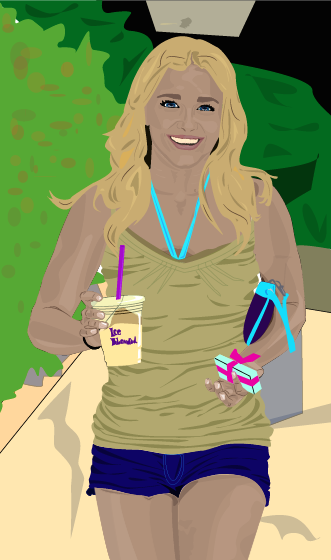
Illustrator Portrait
This process took a long time.
I used lots of layers in order to build up the colors and emphasize the highlights and shadows, not just on the body, but throughout the whole image.
Due to the amount of time it took to complete this project, I spent a lot of time on the clothing, accessories, and face. This meant I ran out of time to complete all the other aspect of the image to the same level. The hair and the background I rushed through and although I am pleased with the overall outcome of the piece, I would have liked to have made this more detailed and in general, just a little better as I feel I could have.

Tuesday, 17 February 2015
Vector Illustration
For my next project I created a vector illustration using only Adobe Illustrator. This began as a more collaborative project, as we folded a sheet of paper in three then blindly and randomly drew the three sections in segments without knowing what the rest of the body looked like. I chose the following image to recreate in Illustrator:
 I added color and used artistic license to make it more personal and what I believe to be aesthetically pleasing. I then came up with a concept for the background design. Due the the Florida State Fair being in town, I decided to use this as inspiration. I wanted to create a unusual, foreign feel to this image causing it to feel a little barren. I used a bright color scheme to contrast with the deserty ground. I believe this fits well with the design of the monster.


Monday, 9 February 2015
Final Logo Design
The logo I decided upon was the first design out of the hand-drawn listings shown in a previous post. In a survey, this proved to be the most popular design and represents the exotic, hawai'iany vibe I was shooting for. I began by drawing the outline with the pen tool.
 I then added color using the pen tool. I didn't want to the logo to appear flat, so I used a range of colors and opacities to build up layers, textures, and depths within the different hues. I wanted to keep the bright, airy feel so stayed with a more pastel color scheme. To allow the word "Smoothies" to be seen clearly, I kept the center of the leaf a light green, making it darker and layering it up closer to the edge.
With the flowers, I wanted bright colors that would stand out and be clearly seen and recognized from a distance. I, therefore, created texture and a range of merging colors by using short strokes, from light in the center, to dark on the outer edges of the petals. To cause them to appear more involved within the logo and not just backing decoration, I placed the "A" and "L" infront of the hibiscus flower with the center parts of the flower overlapping the "A", so the word was still clear, but the second "O" I placed behind the petal. I feel this causes the appearance of all aspects of the logo being intertwined and appearing as one.
The blue of the writing I had originally planned to be white. I was not, however, thinking of a background and, therefore, it would not show up or be clear, possibly looking unfinished. I chose a blue color to make the word "Aloha" stand out. I didn't want this word to appear segregated to the rest of the design, so I tried to merge from dark blue to light blue throughout the word, then into green to the leaf.
The black outline kept the shapes looking separate and clear. This outline was not needed on the bottom of the leaf as there are no other shapes or colors in it's proximity. I, therefore, removed the black outline to create a less harsh look, whilst- I believe- still keeping the finished appearance of the overall logo. The typography within both "Aloha" and "Smoothies" was custom made. The "Aloha" I drew with the pen tool, masking and adjusting a hand drawn type, creating all the letters to be mechanical shapes, except for the last "A", which I tried to create using more fluid lines to appear organic and merge into the leaf more easily. This is apposed to the "Smoothies" for which I used a pre-made font, then created an outline and adjusted the anchor points, angles and curves.
I then added color using the pen tool. I didn't want to the logo to appear flat, so I used a range of colors and opacities to build up layers, textures, and depths within the different hues. I wanted to keep the bright, airy feel so stayed with a more pastel color scheme. To allow the word "Smoothies" to be seen clearly, I kept the center of the leaf a light green, making it darker and layering it up closer to the edge.
With the flowers, I wanted bright colors that would stand out and be clearly seen and recognized from a distance. I, therefore, created texture and a range of merging colors by using short strokes, from light in the center, to dark on the outer edges of the petals. To cause them to appear more involved within the logo and not just backing decoration, I placed the "A" and "L" infront of the hibiscus flower with the center parts of the flower overlapping the "A", so the word was still clear, but the second "O" I placed behind the petal. I feel this causes the appearance of all aspects of the logo being intertwined and appearing as one.
The blue of the writing I had originally planned to be white. I was not, however, thinking of a background and, therefore, it would not show up or be clear, possibly looking unfinished. I chose a blue color to make the word "Aloha" stand out. I didn't want this word to appear segregated to the rest of the design, so I tried to merge from dark blue to light blue throughout the word, then into green to the leaf.
The black outline kept the shapes looking separate and clear. This outline was not needed on the bottom of the leaf as there are no other shapes or colors in it's proximity. I, therefore, removed the black outline to create a less harsh look, whilst- I believe- still keeping the finished appearance of the overall logo. The typography within both "Aloha" and "Smoothies" was custom made. The "Aloha" I drew with the pen tool, masking and adjusting a hand drawn type, creating all the letters to be mechanical shapes, except for the last "A", which I tried to create using more fluid lines to appear organic and merge into the leaf more easily. This is apposed to the "Smoothies" for which I used a pre-made font, then created an outline and adjusted the anchor points, angles and curves.


Subscribe to:
Posts (Atom)